Links to Your Social Media Profiles are like Football Helmet Stickers

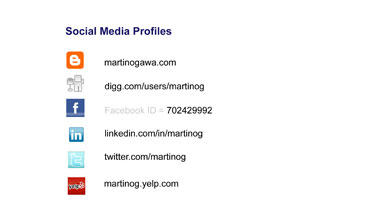
Your should consider your social media links to sites such as Twitter, Facebook and LinkedIn like stickers on a football helmet such as in the picture above. Are you promoting your profile so that you can increase your company or your personal brand awareness? Here is a list of places you should promote your social media profiles: 

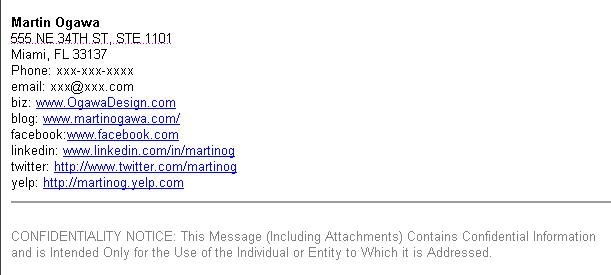
  • Email Footer -Do you have them links in your email footer? See an example below.
  • Business Card – Do your business cards contain your social media profiles? see an example below
  • Blog – Does your blog contain links to your social media sites?
  • Twitter.com – My Profile Page – You can have one website link.
  • LinkedIn.com – You can enter 3 website links on your LinkedIn profile page.
  • Facebook.com – Facebook allows ou to put your websites in our contact information as well as your work website. In addition, when you write a Facebook message, if you put your website link in your message footer, FB will import an image with an automatically generated image of your company logo, hopefully the correct one.

Email Footer Example


Business Card Front

Ogawa Design Business Card Front

Ogawa Design Business Card Front

Business Card Back

Ogawa Design Business Card Back

Ogawa Design Business Card Back

Is your User Name Available on Twitter and Other Sites?

When I have a discussion with many local business owners, friends and family members about Twitter, I usually hear that “I’m too busy to care about what people I don’t know are twittering about”, “What is Twitter again?”, “What is a micro blog?”, “Is it 140 characters?”, “Now why should I get on Twitter?”.

This morning as I logged on to my TweetDeck Twitter Client Application on my MacPro and scanned through the most recent Tweets of the Twitter members that I follow and some of my Favorites I bookmarked using TweetDeck, I found a recommendation from @JMarieDirect, a local Twitter. The site is http://www.namechk.com and allows you to check instantaneously if your user name is available at many top Social Media and Social Networking sites such as Blogger, Digg, Facebook, Flickr, LinkedIn, MySpace and YouTube. As I have talked about before in this blog, if you are a business owner and have a business name or brand that you want to protect, then you should register that name on some of these top social media sites before someone else registers it. In addition, if you have a unique first and last name, then you should also register it.  Here’s the URL or website address again. www.namechk.com will also help you if you are one that doesn’t write down all your user names and passwords and forgot if you registered on one of these sites.

http://www.namechk.com

So if you haven’t yet registered for Twitter or some of these other social media sites, I hope you find the time this week or weekend to do so.


Twitter for Your Biz – First Step 15 Character Twitter Name

Twitter is smoking hot right now — and in the past several months, most of my friends, former classmates and family members have asked me about Twitter. If you haven’t created a Twitter Account for your local business or personal blog yet, now is the time — it’s like the late ’90s when the Internet took off and many of us began to think about buying our domain name to ”protect our beachhead in our market’”.

Here is the very first steps to creating a Twitter account or getting your business on Twitter.

User Name 15 Characters or Less — Think of a Twitter user name that is 15 characters or less for you or your business. Most individuals,  Celebrities and Athletes will use their First and Last Name as their twitter name, their business name or their stage name/brand. Here are some examples:

  • Athletes: LanceArmstrong, dwight_howard, THE_REAL_SHAQ
  • Celebrities: 50cent, snoopdogg, Emeril, algore, MarthStewart, kathyperry, johncmayer, MariahHBF, iamdiddy, britneyspears
  • Professionals: BarackObama, SteveJobs, guykawasaki, andersoncooper, SenJohnMcCain, Gstephanopolous, martinog
  • Businesses: TheEllenShow, YelpMiami, readersdigest, MHEAT, nytimeshealth

2) Do I create a Twitter name using my first and last name or using my business name? I would start by creating a Twitter user name for your first and last name. You will probably end up creating an additional one for your business name.

3) Upper/Lower Case, Punctuation in your Twitter Account

  • Upper and Lower Case Letters – It’s like an email address, you can use upper and lower case letters. So the twitter account MartinOgawa is the same as martinogawa.
  •  Underscore Key “_” – The underscore [_} key is allowed like in THE_REAL_SHAQ.
  • Spaces – Using spaces in your Twitter user name is not allowed.

4) Changing Your Twitter User Name –Once you sign-up , it is possible to change your Twitter user name including modifying the upper and lowercase letters.

5) So here is the Twitter Signup form.

https://twitter.com/signup

Note: I would recommend using your real first name and last name rather than an alias. I will talk about this issue later in one of our blogs.

6) After you signup, here is some important information:

  • Your Twitter Profile Page is: http://www.twitter.com/yourusername
  • To Login, click the Login link at the top of your pofile page or go to http://twitter.com/login
  • User Name: You can login with your Twitter user name or email address, the user name field is not upper and lowercase sensitive so I can login with MartinOgawa or martinogawa.

Good luck! See you on Twitter. And don’t forget add follow @martinog and @OgawaDesign!

Verify our BigCommerce Reseller Status

Ogawa Design Agency | www.OgawaDesign.com | 1331 Brickell Bay Dr, Ste 2703 | Miami, FL 33131 | (786) 220-1295
A Digital Design and Marketing Agency serving clients in South Florida
(Boca Raton, Fort Lauderdale, Hollywood, Miami, Miami Beach, West Palm Beach)
Links | Disclosure Policy