Google Profiles is the New Global Directory

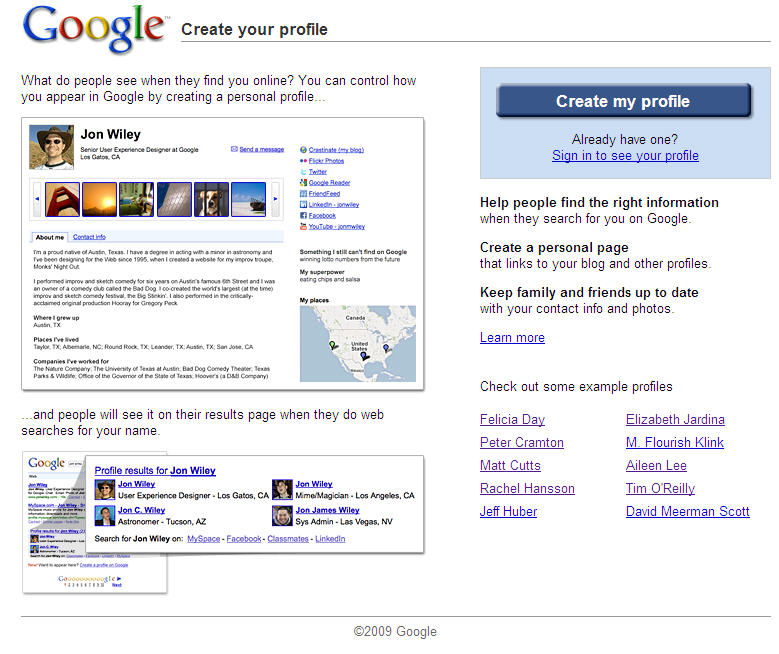
It appears that Google Profiles could be the new Global Telphone Directory or Global White Pages. Today I created my Google Profiles entry and in less than a 30 minutes, when I searched on my name it showed up in the Google Search Results with the other Martin’s in the world.

When you search on a person’s name and scroll to the 11th search result, Google will now display a special “onebox” that shows links to people with that particular name and links to their Google profile.

It took me about 30 minutes to enter my Google Profile information. Before you start entering your “public” profile information I would suggest the following:

1. Go to http://www.google.com/profiles and browse the example profile pages such as the profile of Felicia Day. You should try and get a general idea of wht type of information about yourself that you want to show such as your company, your blog, your personal contact information etc. Google profile allows you to store your personal contact information such as your Instant Messaging Accounts, emails, phone numbers and decide who can view this information. You can even let your Medical Contacts / doctors from Google Health could have access to your mobile phone and email address, if they were members of Google Health.

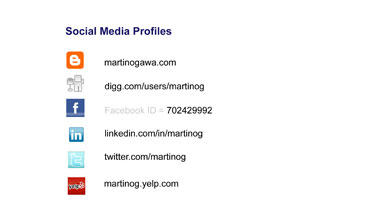
2. Get your list of all your Social Media Profile accounts such as your Twitter, LinkedIn. If you don’t have a list, now is a good time to create one. 

3. Get the picture your will be using for your Google profile.

4. If you have don’t have a Picasa or Flickr photo account, now would be a good time to sign up for and upload eight public photos to display under your profile. If you already have one of these photo accounts with a Public Galley, then you should review any public photos before linking your public Picasa or Flickr galleries. The issue is that the Google Profile Photo widget is mandatory and if you don’t want a big white space of blank photos on your profile page, you’ll need to upload at least eight of them. In my case, I uploaded eight scenery photos of Miami.

4.   So go to http://google.com/profiles to sign-up for your Google Profiles account today. My profile page is http://google.com/profiles/martinog
Enable SMS for Your Twitter Direct Messages, Updates for Selected Members

I have an iPhone with a Twitter client so I never felt there was a reason to enable the SMS messages from Twitter. However, I recently enabled the SMS service to see if I could configure it to receive direct messages only and was surprised when it worked perfectly, even for users that don’t have unlimited SMS service phone contracts. When I enabled the service, my phone didn’t start continuously shaking from the flood of SMS messages from the Twitter members I am following. You can opt-in to any Twitter user you would like to receive SMS updates using the Twitter SMS command On username. So here are the instructions I used to setup my Twitter SMS service and the Twitter SMS commands you need to know.

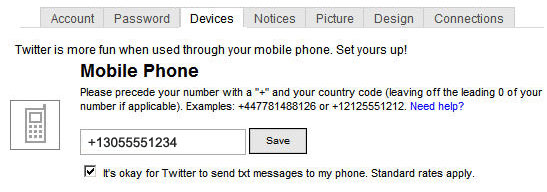
1. From your Twitter Account, Click Settings, Devices. Enter your Mobile Phone Number and select the checkbox for Twitter to Send Text Messages to your phone.  


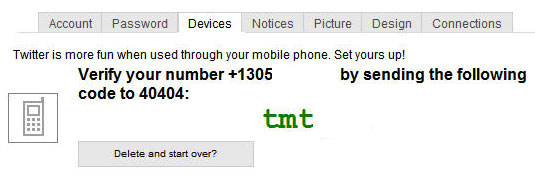
2. Twitter will send you a verfication code. Using your phone, send a text message to 40404 (United States) with that code. You will receive a SMS message back from Twitter that your device and sms alerts are enabled.  


3. You should use the Twitter SMS command “ON” to enable your phone notifications texting it to 40404. Your Phone is now enabled to receive Direct Twitter messages only. To test this, have a friend send you a direct Twitter message. Here are other useful commands:

  • ON
  • OFF
  • STOP, QUIT
  • ON username
  • OFF username
  • FOLLOW username
  • LEAVE username

4. Here are commands for sending a message and other commands.

  • @username +message
  • D username +message
  • WHOIS username
  • GET username
  • NUDGE username
  • FAV username
  • STATS
  • INVITE phonenumber

A link to all the Twitter site listing these command is at: http://help.twitter.com/portal

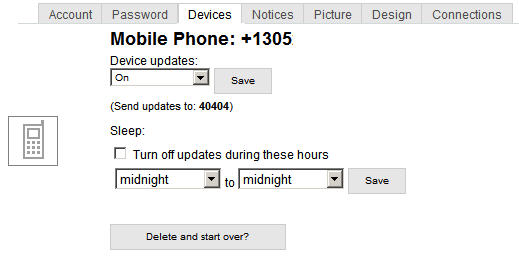
5. Finally, Twitter has a Device Setting that allows you to turn on and off your updates via the web and to stop them at night. 

Links to Your Social Media Profiles are like Football Helmet Stickers

Your should consider your social media links to sites such as Twitter, Facebook and LinkedIn like stickers on a football helmet such as in the picture above. Are you promoting your profile so that you can increase your company or your personal brand awareness? Here is a list of places you should promote your social media profiles: 

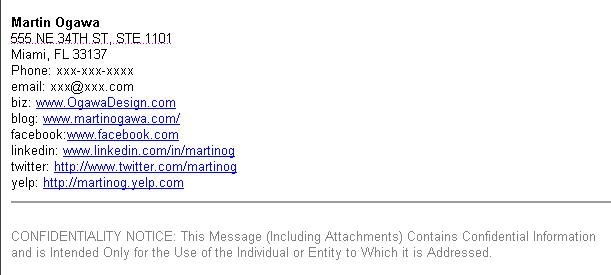
  • Email Footer -Do you have them links in your email footer? See an example below.
  • Business Card – Do your business cards contain your social media profiles? see an example below
  • Blog – Does your blog contain links to your social media sites?
  • Twitter.com – My Profile Page – You can have one website link.
  • LinkedIn.com – You can enter 3 website links on your LinkedIn profile page.
  • Facebook.com – Facebook allows ou to put your websites in our contact information as well as your work website. In addition, when you write a Facebook message, if you put your website link in your message footer, FB will import an image with an automatically generated image of your company logo, hopefully the correct one.

Email Footer Example


Business Card Front

Ogawa Design Business Card Front

Ogawa Design Business Card Front

Business Card Back

Ogawa Design Business Card Back

Ogawa Design Business Card Back

How to Delete a Twitter Update

Did you mistweet or send a Twitter update that you now want to delete? If you want to remove an update that you posted to Twitter, it’s very easy. Here are instructions.

From Twitter.com

1. From your Twitter.com Home or Profile page, click “updates”

2. Put your cursor over the tweet you want to delete. You will see a trash can icon to the right of the message below the star or favorites icon as shown below.

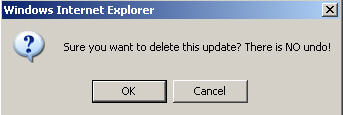
3. You will receive the following dialog box, click [OK].

From TweetDeck

4. Click Other Actions –> Tweet –> Delete

Is your User Name Available on Twitter and Other Sites?

When I have a discussion with many local business owners, friends and family members about Twitter, I usually hear that “I’m too busy to care about what people I don’t know are twittering about”, “What is Twitter again?”, “What is a micro blog?”, “Is it 140 characters?”, “Now why should I get on Twitter?”.

This morning as I logged on to my TweetDeck Twitter Client Application on my MacPro and scanned through the most recent Tweets of the Twitter members that I follow and some of my Favorites I bookmarked using TweetDeck, I found a recommendation from @JMarieDirect, a local Twitter. The site is http://www.namechk.com and allows you to check instantaneously if your user name is available at many top Social Media and Social Networking sites such as Blogger, Digg, Facebook, Flickr, LinkedIn, MySpace and YouTube. As I have talked about before in this blog, if you are a business owner and have a business name or brand that you want to protect, then you should register that name on some of these top social media sites before someone else registers it. In addition, if you have a unique first and last name, then you should also register it.  Here’s the URL or website address again. www.namechk.com will also help you if you are one that doesn’t write down all your user names and passwords and forgot if you registered on one of these sites.

http://www.namechk.com

So if you haven’t yet registered for Twitter or some of these other social media sites, I hope you find the time this week or weekend to do so.


Verify our BigCommerce Reseller Status

Ogawa Design Agency | www.OgawaDesign.com | 1331 Brickell Bay Dr, Ste 2703 | Miami, FL 33131 | (786) 220-1295
A Digital Design and Marketing Agency serving clients in South Florida
(Boca Raton, Fort Lauderdale, Hollywood, Miami, Miami Beach, West Palm Beach)
Links | Disclosure Policy